Showing posts with label Code snippet. Show all posts

Thursday, December 7, 2017

Modeling - Probability distribution and JMeter code


Skewness:
"In probability theory and statistics, skewness is a measure of the asymmetry of the probability distribution of a real-valued random variable about its mean. The skewness value can be positive or negative, or undefined."  (source wikipedia)


Exponential:
"In probability theory and statistics, the exponential distribution (also known as negative exponential distribution) is the probability distribution that describes the time between events in a Poisson point process, i.e. a process in which events occur continuously and independently at a constant average rate." (source wikipedia)

When designing application simulation model for performance testing you will come across scenarios which will require you to use different probability distribution to emulate correct production behavior. For example, average # of items per order, number of sessions or think time between pages.

The code below allows you to generated a skewed & exponential distribution for such a case in JMeter to emulate correct behavior as observed in production.

Skewed distribution code
min = VALUE; //update this value to minimum value expected in the distribution
max = VALUE; //update this value to maximum value expected in the distribution
bias = VALUE; //update this to a value against which  the distribution should be biased toward
influence = 1; //[0.0, 1.0] - 1 means 100% influence
rnd = Math.random()*(max-min)+min;
mix = Math.random()*influence;
result = rnd *(1 - mix) + bias * mix;

NOTE: This code is from stackoverflow and I don't remember the link to it. If you do, please let me know.

Exponential distribution code
Avg = VALUE; //update this value to reflect mean value for the distribution 
MIN = VALUE; //update this value to minimum value expected in the distribution
result = (long)(-(double)Avg*Math.log(Math.random()))+MIN;

Example (Exponential distribution):
MIN = 1;
Avg = 2.5;
result = (long)(-(double)Avg*Math.log(Math.random()))+MIN;
If above code is executed for 200 iterations/thread, it will generate the values depicted in the histogram below. More iterations executed, better the distribution will look like. For testing, two threads were used.


NOTE: If you want to have a hard boundary, add an if condition in the code to check against a MAX value.

Example (Skewed distribution):
min = 1;
max = 10;
bias = 3;
influence = 1;
rnd = Math.random()*(max-min)+min;
mix = Math.random()*influence;
result = rnd *(1 - mix) + bias * mix;

If above code is executed for 200 iterations/thread, it will generate the values depicted in the histogram below. More iterations executed, better the distribution will look like. For testing, two threads were used.


Use beanshell sampler to generate the value and save it in a variable. Pass variable into the loop controller to control it. Below is the code in beanshell sampler.


NOTE:
1: Make sure you run a few tests to get the distribution right to reflect what is happening in production.
2: If you have a better code to generate probability distribution be it exponential or any other kind, I would love to  know.

Tuesday, September 24, 2013

SoapUI - using WHERE IN clause and Groovy code to concatenate strings

Recently, I worked on a project that was using SoapUI Pro to test an application. One of the testers had a working test case in SoapUI but wanted it done differently and therefore, approached me for a solution. Following outlines the scenario and a quick groovy code I wrote to address what he really wanted.

Scenario:
He was connecting to a database using SoapUI JDBC step and retrieving more than one result for a SQL query. He was then using FOR loop to iterate through all the values. In the FOR loop, he had another JDBC step which took result value as a parameter and returned an appropriate response (using assertion to validate the response).

What he wanted:
He wanted to get rid of FOR loop and pass all the values returned from the first JDBC step into second JDBC step.

Solution:
The solution I came up with was to concatenate all the values from the first JDBC step using a groovy code and then pass the returned string from the code into a separate JDBC step. Also change the SQL query in the final JDBC step to use WHERE IN clause.

For blogging purpose, I am connecting to MySQL database on my local machine using SoapUI Pro 4.5.2 (trial version).

I have created two tables in MySQL database. First table is a class which contains StudentName and ClassName. Second table is a Subject with StudentName and Subject fields. For code demonstration purpose, I will be querying the database to return me names of all the stundent that are in Class 3. Then I will concatenate the names using groovy code and pass it to a separate JDBC step to get me the StudentName and the Subject they are enrolled in.

NOTE:
  • This code does not cater for all the possibilities as it is only for blogging purpose. 
  • Also make sure you are adding the MySQL JDBC driver in SoapUI ext folder so you can connect to the database.
  • I am sure the code below can be refined further. saving xmlRecCount.toInteger() value to a parameter.
Steps:
  1. Add a JDBC Step to the test case. This JDBC step with query the class table and return student names that are in class 3. 
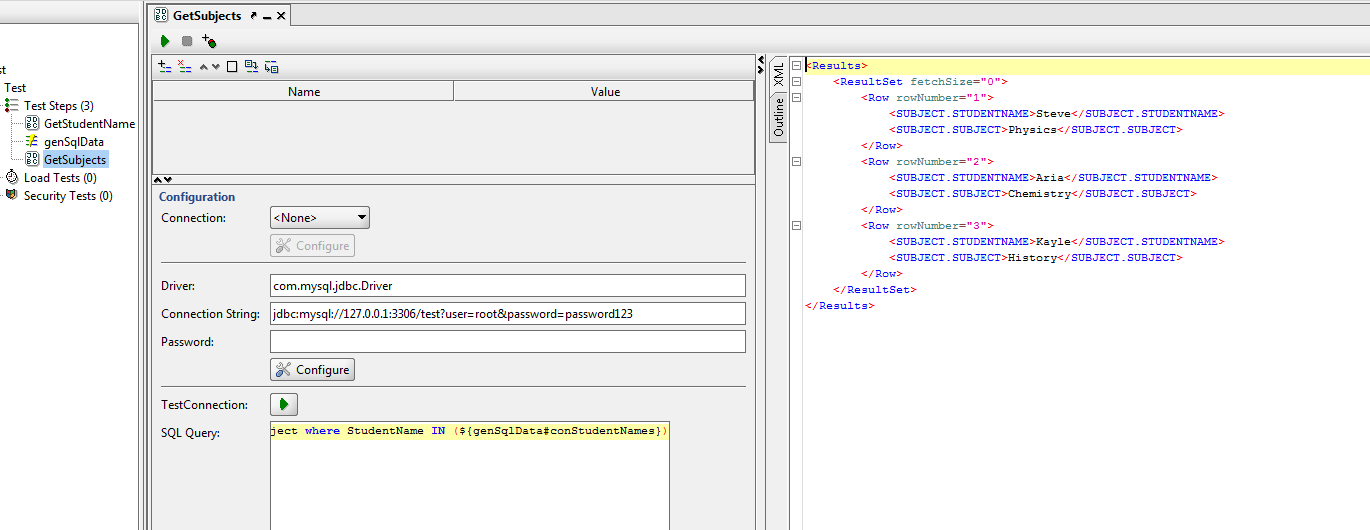
  2. Add a DataGen step to the test case. In this step create a parameter with "Type" as "Script". This Script will take response from the first step, concatenate all the student names into one string and pass it to the parameter. 
  3. Finally add another JDBC step to the test case. This step will query the Subject table uisng WHERE IN Clause and IN value will be the parameter created in step 2 above.
Code:
def groovyUtils = new com.eviware.soapui.support.GroovyUtils(context)
def holder = groovyUtils.getXmlHolder("GetStudentName#ResponseAsXml")

def concSqlString=""   //initialize parameter string concSqlString
def cnt =1             //initialize counter

//Get the total count of records that have the CLASS.STUDENTNAME
def xmlRecCount=holder["count(//Results[1]/ResultSet[1]/Row/CLASS.STUDENTNAME)"]


//check if only one row is returned
if (xmlRecCount.toInteger()==1)
{
      node = holder.getNodeValue('//Results[1]/ResultSet[1]/Row/CLASS.STUDENTNAME')
     concSqlString=concSqlString +"\""+node+"\""
}
else{
        //for each node, concatenate the node value to concSqlString variable
 for (node in holder['//Results[1]/ResultSet[1]/Row/CLASS.STUDENTNAME'])
 {
 if(cnt<xmlRecCount.toInteger()){
  concSqlString=concSqlString+"\""+node+"\","
  cnt=cnt+1
 }
 else
 concSqlString=concSqlString +"\""+node+"\""
 }
}

//return the concSqlString 
return concSqlString

Saturday, August 10, 2013

LoadRunner - Selecting random value using lr_paramarr_random function

In performance testing, it is really important to simulate a realistic user path through an application. For example, randomly select an image link from a gallery or select a share from a share list. In such situations, you can use the LoadRunner lr_paramarr_random function to select a random value from a captured parameter array. Similarly, you can also write a code to do the same.

Before you use the above function, you will need to use web_reg_save_param function to capture all the ordinal values. This can be achieved by passing "ORD=ALL" into the function.

The following code demonstrates the use of lr_paramarr_random function. The code saves link Ids using  web_reg_save_param function and then uses lr_paramarr_random function to randomly select an Id value. The value is passed as a parameter in web_text_link function to navigate to the appropriate webpage.

Action()
{

 //Capture all the Link IDs
 web_reg_save_param("LinkID","LB=id=\"","RB=\" href=\"default.aspx?content=business_","ORD=ALL",LAST);

 lr_start_transaction("VU01_01_Homepage");
 web_browser("website", 
  DESCRIPTION, 
  ACTION, 
  "Navigate={WebsiteUrl}", 
  LAST);

 lr_end_transaction("VU01_01_Homepage",LR_AUTO);

 lr_think_time(10);


 //Save a randomly selected ID to a Parameter
 lr_save_string(lr_paramarr_random("LinkID"),"RandomLink"); 

 //Printout the randomly selected parameter
 lr_output_message("%s",lr_eval_string("{RandomLink}"));

 //Navigate to the appropriate webpage associated to the ID
 lr_start_transaction("VU01_02_RandomLink");

 web_text_link("Links", 
  "Snapshot=t2.inf", 
  DESCRIPTION, 
  "Id={RandomLink}",
  ACTION, 
  "UserAction=Click", 
  LAST);

 lr_end_transaction("VU01_02_RandomLink",LR_AUTO);
 
 web_browser("Sync", 
  "Snapshot=t3.inf", 
  DESCRIPTION, 
  ACTION, 
  "Sync", 
  LAST);

 return 0;
}
Following is a screenshot of replay log, displaying the random id's selected for each iteration. It also displays the values captured using web_reg_save_param function.

Tuesday, May 14, 2013

Groovy - Saving CouchDB runtime statistics json file to excel file

Last year, I wrote a blog on how to get CouchDB Runtime Statistics and saving it as a json file. However, want I really wanted was to save and open  the file in excel. Therefore, I wrote a Groovy script to read Runtime Statistics data from json file and save all the Key values into an excel file.

Below is the prerequisite to execute the script as well as the script.

NOTE: Their already exists a python script to capture the CouchDB runtime statistics.

Prerequisite:
  • Download and Install Groovy Console application.
  • Download and copy  jxl.jar file into the Groovy lib folder.
Script:
import groovy.json.*
import jxl.*
import jxl.write.*


Parameter = ["Group","Key","current","max", "mean", "min", "stddev","sum"]; //couchDB worksheet headers

exlfile = "C:\\Harinder\\Groovy\\couchDB.xls"; //excel file path

if   (new File(exlfile).exists())  //check if file exists esle create a new one, write label and close the file
{
    println "File already exists";
}
else
{
    WritableWorkbook workbook1 = Workbook.createWorkbook(new File(exlfile))
    WritableSheet sheet1 = workbook1.createSheet("couchDB", 0);
    //Label label = new Label(column, row, "Text input in Excel");
    for (int iheader=0; iheader<8;iheader++)
    {
        Label label = new Label(iheader, 0, Parameter[iheader]);
        sheet1.addCell(label);
    }
    workbook1.write();
    workbook1.close();
}

def reader =new BufferedReader(new FileReader("C:\\Harinder\\Groovy\\couchDB.json")); //create a json file into a buffer
def jparsedData =new JsonSlurper().parse(reader);


/*open an exisiting excel file, write Key values and close the file*/
Workbook workbook = Workbook.getWorkbook(new File(exlfile)); 
WritableWorkbook copy = Workbook.createWorkbook(new File(exlfile),workbook);

Groups = jparsedData.collect{a,b->a}.reverse(); //Groups=["couchdb","httpd_request_methods"...]

WritableSheet sheet = copy.getSheet(0);
int groupCount=1;
int rowCount=1;
for (int gCount=0;gCount<Groups.size();gCount++)  //iterate through the Groups
 {   
    tGroups=Groups[gCount]; //assign Groups[gCount] value to a temporary variable tGroups
    sheet.addCell(new Label(0,groupCount,  tGroups)) //save tGroups into the sheet
    Keys = jparsedData."$tGroups".collect{a,b->a}.reverse();  //collect all the Keys associated to Group[gGroup]
    for (int kCount=0;kCount<Keys.size();kCount++) // iterate through all the Keys and save their min,max,count,mean,stddev,sum values into the sheet
     {
       tKeys=Keys[kCount];
       rowCount=kCount+groupCount; 
       sheet.addCell(new Label(1,rowCount,  tKeys));
       sheet.addCell(new Label(2,rowCount,  jparsedData."$tGroups"."$tKeys".current.toString()));
       sheet.addCell(new Label(3,rowCount,  jparsedData."$tGroups"."$tKeys".max.toString()));
       sheet.addCell(new Label(4,rowCount,  jparsedData."$tGroups"."$tKeys".mean.toString()));
       sheet.addCell(new Label(5,rowCount,  jparsedData."$tGroups"."$tKeys".min.toString()));
       sheet.addCell(new Label(6,rowCount,  jparsedData."$tGroups"."$tKeys".stddev.toString()));
       sheet.addCell(new Label(7,rowCount,  jparsedData."$tGroups"."$tKeys".sum.toString()));
     }
     groupCount=rowCount;
 }

copy.write()
copy.close()

Script steps:
  1. Check couchDB excel file exists. If it does not, create it and add all the necessary headers to a worksheet and close the file.
  2. Read and parse the json file.
  3. Open the couchDB file for writing.
  4. Navigate through the parsed json data and save all the Group names.
  5. Navigate through each group name in step 4 and save all the Keys associated to it.
  6. For each Keys saved in step 5, navigate through it and save all the associated values into excel file.
  7. Once done, close the worksheet.

Result:
 

Tuesday, April 2, 2013

Generating Websphere verboseGC Graph in LoadRunner Analysis tool

Few weeks ago, I was working for a client and I wanted to analyze Websphere Application server verboseGC logs. I could have used tools such as IBM PMAT but what I really wanted was to merge verboseGC graph with response time graph in Load Runner and this required a lot of manual work. Therefore, I modified existing Silkperformer vbscript to Websphere verboseGC vbscript.

For the blogging purpose, this script saves only handful of verboseGC attributes into CSV file. You can then import the csv file as an external monitor in Load Runner Analysis tool.

NOTE: You can modify this script to suit your requirements. Also make sure everything is contained within verbosegc tag in your verboseGC log file. See the example below.

Please read the following blog on how to generate the CSV file.

Websphere verboseGC Vbscript
Option Explicit
 
Dim xmlDoc
Dim af, gc, timestamp, gcIntervalms, DateTimeArray, afDate, afTime, afIntervalms,minimum,requestedBytes,Totalms,gcTotalms,gcTotal,Time
Dim reportFile, outputFile
Dim myFSO, fileHandle
 

'Murray Wardle code
Set xmlDoc = CreateObject("Microsoft.XMLDOM")
 
Const ForReading = 1, ForWriting = 2, ForAppending = 8
 
If Wscript.Arguments.Count = 0 Then
    msgbox "Please specify the overview Report file to process"
Else
 
 ' Get report file name & set output filename
    reportFile = Wscript.Arguments(0)
 outputFile = Left(reportFile, Len(reportFile)-3) + "csv"
 
 xmlDoc.async = false
 xmlDoc.SetProperty "SelectionLanguage", "XPath"
 xmlDoc.SetProperty "ServerHTTPRequest", True
 xmlDoc.validateOnParse = False
 xmlDoc.resolveExternals = False
 
 'load overview report
 xmlDoc.load(reportFile)
 xmlDoc.setProperty "SelectionLanguage", "XPath"
 
 'open csv file to dump results into
 Set myFSO = CreateObject("Scripting.FileSystemObject")
 Set fileHandle = myFSO.OpenTextFile(outputFile, ForWriting, True)

'Modified code for verboseGC
fileHandle.WriteLine("date,time,afIntervalms,requestedBytes,gcIntervalms,gcTotalms,Totalms")
 
For Each af In xmlDoc.SelectNodes("//af")
  timestamp = af.getAttribute("timestamp")'get af timestamp attribute value
  DateTimeArray=Split(timestamp," ",-1,1) 'split the date time into array
  afDate=FormatDateTime(DateTimeArray(1)+"/"+DateTimeArray(0)+"/"++DateTimeArray(3),vbShortDate) 'format into date
  afTime=FormatDateTime(DateTimeArray(2),vbLongTime) 'format into time
 
  afIntervalms=af.getAttribute("intervalms") 'get af intervalms attribute value
 
  For Each minimum In af.SelectNodes("./minimum") 'get minimum requested bytes value
    requestedBytes = minimum.getAttribute("requested_bytes")
  Next
  For Each gc In af.SelectNodes("./gc") 'get gc intervalms value
    gcIntervalms = gc.getAttribute("intervalms")
  Next
  For Each gcTotal In af.SelectNodes("./gc/time") 'get total gc time value
    gcTotalms = gcTotal.getAttribute("totalms")
 Next
 For Each Time In af.SelectNodes("./time")
    Totalms = Time.getAttribute("totalms") 'get total time value
 Next   
 fileHandle.WriteLine(afDate+","+afTime+","+afIntervalms+","+ requestedBytes+","+ gcIntervalms+","+gcTotalms+","+Totalms)
Next
fileHandle.Close
end if
Websphere Application verboseGC log Example


CSV Output


VerboseGC graph in LoadRunner

Saturday, September 8, 2012

Generating UUID in Loadrunner

There have been multiple times where I needed to generate UUID (Verion 4) in Loadrunner but there is no inbuild function to do so. Therefore, I had to either create or modify functions to satisfy my need.

NOTE: Loadrunner does have a function(lr_generate_uuid) for UUID but it does not generate your standard UUID.

Below are three different UUID functions that I normally use depending on the requirement.

For example, If only requirement is that UUID be 32 hexadecimal digits then I will use simple LR UUID to generate it. If there are proper checks in place to see the UUID generated is valid then I will use a proper UUID function's. Therefore you can select which one you want to use depending on your requirement.

Simple UUID - this is a simple 32 hexadecimal digits. You can generate hexaadecimal in Loadrunner using %x or %X Random number.

Following screenshot shows how to generate a random Hexadecimal.


Lr UUID - this function generates 32 hexadecimal digits UUID using Version 4(random) variant. This is the most common format I have seen applications use.

Win UUID - this function uses windows inbuild CoCreateGuid function (ole32.dll). The original code is written by Scott Moore and I have modified it a little bit.

NOTE: I have left the deallocation of pointer for you to do in the code.

#define Hexlength 50  //Max length

char *lr_guid_gen(); //explicitely declare the function
char *lr_uuid_gen(); //explicitely declare the function

Action()
{   

  char *Win_UUID=0; //declare window function UUID variable 
  char *slr_UUID=0; //declare loadrunner function UUID variable
  char *lr_uuid;  //declare UUID variable

  Win_UUID=(char *)malloc(sizeof(char)); //allocate dynamic memory
  slr_UUID=(char *)malloc(sizeof(char)); //allocate dynamic memory

  Win_UUID=lr_guid_gen(); //execute Window UUID function
  slr_UUID=lr_uuid_gen(); //execute LR UUID function
  lr_uuid=lr_generate_uuid(); //assign result generated by loadrunner internal
  function to lr_uuid

  /*output a simple UUID*/
   lr_output_message("smp_UUID: %s",lr_eval_string("{sHex}{sHex}-{sHex}-{sHex}-{sHex}-{sHex}{sHex}{sHex}"));
 //you could use something like this as well -> lr_output_message("smp_UUID: %s",lr_eval_string("{sHex}{sHex}-{sHex}-{FourHex}-{sHex}-{sHex}{sHex}{sHex}"));

  /*output loadrunner UUID*/
  lr_output_message("slr_UUID: %s",lr_eval_string(slr_UUID));

  /*output window generated UUID*/
  lr_output_message("Win_UUID: %s",lr_eval_string(Win_UUID));

  /*output base64 UUID*/
  lr_output_message("%s",lr_uuid);
 
 /*frees uuid created by lr_generarte_uuid*/
 lr_generate_uuid_free(lr_uuid);
 
 return 0;

}


/*This function uses windows ole32 CoCreateGuid function to generate UUID*/
char *lr_guid_gen()

{

    typedef struct _GUID

    {

        unsigned long Data1;

        unsigned short Data2;

        unsigned short Data3;

        unsigned char Data4[4];

    } GUID;

    char guid[Hexlength];
    GUID m_guid;

    lr_load_dll ("ole32.dll");

    CoCreateGuid(&m_guid);

    sprintf (guid, "%08lx-%04x-%04x-%02x%02x-%02x%02x%02x%02x%02x%02x",

    m_guid.Data1, m_guid.Data2, m_guid.Data3,

    m_guid.Data4[0], m_guid.Data4[1], m_guid.Data4[2], m_guid.Data4[3],

    m_guid.Data4[4], m_guid.Data4[5], m_guid.Data4[6], m_guid.Data4[7]);


    return guid;
}


/*This function uses loadrunner random numbers to generate version 4 UUID*/
char *lr_uuid_gen()
{
  char uuid[Hexlength];
  switch (atoi(lr_eval_string("{RandNo}")))
  {
   case 1:
    sprintf(uuid,lr_eval_string("{Hex}{Hex}-{Hex}-{FourHex}-{aHex}-{Hex}{Hex}{Hex}"));
    break;
   case 2:
    sprintf(uuid,lr_eval_string("{Hex}{Hex}-{Hex}-{FourHex}-{bHex}-{Hex}{Hex}{Hex}"));
    break;
   case 3:
    sprintf(uuid,lr_eval_string("{Hex}{Hex}-{Hex}-{FourHex}-{EightHex}-{Hex}{Hex}{Hex}"));
    break;
   case 4:
    sprintf(uuid,lr_eval_string("{Hex}{Hex}-{Hex}-{FourHex}-{NineHex}-{Hex}{Hex}{Hex}"));
    break;
   default:
    break;
  }
 return uuid;
}


Output:
Action.c(23): smp_UUID: 492ec6db-dcaf-fb6d-1009-72a542e26ee7
Action.c(26): slr_UUID: c4fbde14-4f41-4963-8400-32f77f6e0633
Action.c(29): Win_UUID: cee9f8fd-3715-4183-b367-a4c13b84a7c8
Action.c(32): LBase_64: J3+Lpj2t20KzpBSgg0e5Bg==

Action.c(23): smp_UUID: 65ea1bc1-8434-e05b-92f5-7e23a0f7e253
Action.c(26): slr_UUID: 358390f7-2405-4b03-8be4-b8c61b90a2b6
Action.c(29): Win_UUID: 75d74eb9-a2bf-42b4-b114-61d634a2c7db
Action.c(32): LBase_64: uzxvhpLXP0ifUjMSqzngCQ==

Action.c(23): smp_UUID: 0a86ce02-7413-1da3-bd39-63fc4cb9d60e
Action.c(26): slr_UUID: 726546c5-500d-4ef2-a27e-f447bb925143
Action.c(29): Win_UUID: db65a02f-1ca1-4fb3-ab22-0e41088b1633
Action.c(32): LBase_64: IJV65qREQUOe5CVwcE5aVQ==
 
Action.c(23): smp_UUID: 6678a6ac-3356-eb2f-63e6-02fe5a5185f2
Action.c(26): slr_UUID: acddc8f9-746d-4655-838c-7802483e06bb
Action.c(29): Win_UUID: e7a7ff1c-4019-4053-a51a-7567582d825c
Action.c(32): LBase_64: i+b5VpgA7Ueis8r1bxBTJg==
 
Action.c(23): smp_UUID: 3f8eb05e-9936-b5fc-6be9-454fd8fb9ab5
Action.c(26): slr_UUID: cc835158-9e86-4df5-8a4e-1e3f25808754
Action.c(29): Win_UUID: 3d604abe-046b-43dc-a5c4-e759fb04f960
Action.c(32): LBase_64: Rk2mSYUuOUmU0Yti_W+a5Q==

If you have a different function to generate UUID in Loadrunner, I would love to know about it.

Friday, June 1, 2012

Publishing result in Silkperformer

SilkPerformer reports percentiles in a different section than the main table and it can be time consuming, if you want to publish all the metrics in a single table. Therefore to solve this issue, a colleague (Murray Wardle) of mine wrote a visual basic script that generates a table with all the metrics.

He has kindly allowed me to share it here and below is his description on how to use it.

"Publishing results from SilkPerformer can sometimes be very time consuming. Most projects will have requirements involving the 90th or 95th percentiles and for some reason SilkPerformer reports percentiles in a different section of the report and not in the main table I wish to publish.

Generally in my scripts I’ll use Timers for measuring response times (I’m not too keen of the automatic page and form timers) for timers controlled with the MeasureStart() and MeasureStop() functions, Inserting the following into the TInit will enable percentiles to be calculated for the Timers.

MeasureCalculatePercentiles(NULL,MEASURE_TIMER_RESPONSETIME);

Unfortunately percentiles are displayed in a different section of the report to the Min, Avg, Max, StdDev, Count, and it’s a waste of time trying to copy and paste the values into a spreadsheet.

So, here is a simple little script which does the work. Just drag and drop the OverviewReport.xml file onto the script and it will create a csv file with the following:

ScriptName, TimerName, Min, Avg, Max, StDev, Count, 50th Perc, 90th Perc, 95th Perc, 99th Perc"


NOTE: You are allowed to use the code as long as you acknowledge the author.

'Copyright (c) 2012 Murray Wardle, murray.wardle@advancedperformance.com.au
'Permission is hereby granted, free of charge, to any person obtaining a copy of this software and associated documentation files (the "Software"), to deal in the Software without restriction, including without limitation the rights to use, copy, modify, merge, publish, distribute, sub license, and/or sell copies of the Software, and to permit persons to whom the Software is furnished to do so, subject to the following conditions:
'The above copyright notice and this permission notice shall be included in all copies or substantial portions of the Software.
'THE SOFTWARE IS PROVIDED "AS IS", WITHOUT WARRANTY OF ANY KIND, EXPRESS OR IMPLIED, INCLUDING BUT NOT LIMITED TO THE WARRANTIES OF MERCHANTABILITY, FITNESS FOR A PARTICULAR PURPOSE AND NON INFRINGEMENT. IN NO EVENT SHALL THE AUTHORS OR COPYRIGHT HOLDERS BE LIABLE FOR ANY CLAIM, DAMAGES OR OTHER LIABILITY, WHETHER IN AN ACTION OF CONTRACT, TORT OR OTHERWISE, ARISING FROM, OUT OF OR IN CONNECTION WITH THE SOFTWARE OR THE USE OR OTHER DEALINGS IN THE SOFTWARE. 

Option Explicit

Dim xmlDoc
Dim scriptName, scriptNodes, SNode, TNode, timerNodes, timerName
Dim reportFile, outputFile
Dim myFSO, fileHandle
Dim min, avg, max, stDev, count, p50, p90, p95, p99
Set xmlDoc = CreateObject("Microsoft.XMLDOM") 

Const ForReading = 1, ForWriting = 2, ForAppending = 8 

If Wscript.Arguments.Count = 0 Then
    msgbox "Please specify the overview Report file to process"
Else

 ' Get report file name & set output filename
    reportFile = Wscript.Arguments(0) 
 outputFile = Left(reportFile, Len(reportFile)-3) + "csv"

 xmlDoc.async = false 
 xmlDoc.SetProperty "SelectionLanguage", "XPath" 
 xmlDoc.SetProperty "ServerHTTPRequest", True
 xmlDoc.validateOnParse = False 
 xmlDoc.resolveExternals = False

 'load overview report
 xmlDoc.load(reportFile)
 xmlDoc.setProperty "SelectionLanguage", "XPath"  

 'open csv file to dump results into
 Set myFSO = CreateObject("Scripting.FileSystemObject")
 Set fileHandle = myFSO.OpenTextFile(outputFile, ForWriting, True)
 fileHandle.WriteLine("Script,Timer,Min,Avg,Max,StDev,Count,50th Perc,90th Perc,95th Perc,99th Perc")

 'For each script
 Set scriptNodes = xmlDoc.selectNodes("/Overview_Report_Data/UserGroups/Group") 
 For Each SNode in scriptNodes 
  scriptName = SNode.SelectSingleNode("Name").text

  'For each measure of type Timer
  Set timerNodes = SNode.selectNodes("Measures/Measure") 
  For Each TNode in timerNodes 
   If TNode.SelectSingleNode("Class").text = "Timer" then
   
    ' Extract the timer data
    timerName = TNode.SelectSingleNode("Name").text
    min = TNode.SelectSingleNode("MinMin").text
    avg = TNode.SelectSingleNode("Avg").text
    max = TNode.SelectSingleNode("MaxMax").text
    stDev = TNode.SelectSingleNode("Stdd").text
    count = TNode.SelectSingleNode("SumCount2").text
    p50 = TNode.SelectSingleNode("Percentiles/Values/Value[1]/Value").text
    p90 = TNode.SelectSingleNode("Percentiles/Values/Value[2]/Value").text
    p95 = TNode.SelectSingleNode("Percentiles/Values/Value[3]/Value").text
    p99 = TNode.SelectSingleNode("Percentiles/Values/Value[4]/Value").text

    'Write to File
    fileHandle.WriteLine(scriptName+","+timerName+","+min+","+avg+","+max+","+stDev+","+count+","+p50+","+p90+","+p95+","+p99)
   
   end if
  
  Next 'TNode in timerNodes 

 Next 'SNode in scriptNodes
 
 fileHandle.Close
 
End If


Example:
1: Save the above code as a visual basic script into a folder. Lets call this script as "ExtractOverviewReportData.vbs".
2: Navigate to you SilkPerformer project and copy OverviewReport.xml into the folder where you have saved vbs script. See the screenshot below.
When you open the xml file, it would look something like this:


  1.100000000
  ABCDEFG
   ForMyBlog.tsd (D:\Silkperformer_Projects\ABCDEF\) 
  Silk Performance Explorer
  Monday, 20 April 2012 - 3:00:00 AM
  1
  
Header ABCD 8 None 1 28/05/2012 1:00:12 AM 6280.000000000 4 Merged MPPO SVT 23
... Timer #Overall Response Time# Response time[s] Seconds 0.000000000 0.000000000 3 2 Response time[s] 200.000000000 100.000000000 830.000000000 35000.000000000 0.500000000 60.00000000 6.412345678 11.123456789 0.000000000 0 0.000000000 0 0 0 50 1.123456789 90 22.123456789 95 60.00000000 99 60.00000000 ...
3:Now drag and drop the OverviewReport.xml file onto the script and it will create a csv file.
4: Now open up the csv file in excel and you should have all the necessary metric. You will see something like this:

Monday, May 21, 2012

Querying and Inserting records into MongoDB using LoadRunner

This simple LR script inserts and retrieves a record from mongoDB. You can modify it to accommodate your own need.

Requirement:
Download Java driver for mongoDB and add it to the classpath in the java script.


import java.lang.String;
import java.net.UnknownHostException;
import java.util.Set;
import com.mongodb.BasicDBObject;
import com.mongodb.DB;
import com.mongodb.DBCollection;
import com.mongodb.DBCursor;
import com.mongodb.DBObject;
import com.mongodb.Mongo;
import com.mongodb.MongoException;

import lrapi.lr;
public class Actions
{ 
    static String HostName ="localhost";  
    static Integer Port = 27017;
    static String Username ="Harinder";
    static String Password ="Password";
    Mongo mDB;
    DB db;

 public int init() throws Throwable{
    try { 
        mDB= new Mongo( HostName , Port ); //connect to MongoDB using HostName and Port
        db = mDB.getDB("test"); // get test database from MongoDB
        boolean auth = db.authenticate(Username, Password.toCharArray()); //authenticate user access to test database
        if (auth = true) 
           lr.output_message("Successfully Authenticated");
        else
           lr.output_message("Incorrect Username/Password");

     }catch (UnknownHostException e) {
        e.printStackTrace();
    }
     return 0;
   }//end of init function

 public int action() throws Throwable {
     try { 
          InsertInToMongoDB("Harinder1", "Seera1", "ThisIsMongoDB1@gmail.com");
 
         }catch (MongoException e){
          e.printStackTrace();
         }

     try { 
         SearchMongoDB("Harinder");
 
         }catch (MongoException e){
          e.printStackTrace();
        }
 return 0;
 }//end of action function


 public int end() throws Throwable {
     mDB.close();
  return 0;
 }//end of end function


   public void InsertInToMongoDB(String FirstName, String LastName, String Email)
   { 
       // Get collection from mongoDB.
       // If collection doesn't exist, mongoDB will create it automatically
       DBCollection collection = db.getCollection("MyCollection");
       BasicDBObject document = new BasicDBObject();  // create a document to store key and value
       document.put("FirstName",FirstName);
       document.put("LastName", LastName);
       document.put("Email", Email);
       collection.insert(document);   //save the document into collection
   }


   public void SearchMongoDB(String FirstName)
   { 
       DBCollection collection = db.getCollection("MyCollection");
       BasicDBObject srchQuery = new BasicDBObject(); // search query
       srchQuery.put("FirstName", FirstName);
       DBCursor cur = collection.find(srchQuery); // query it
 
       // loop over the cursor and display the retrieved result
       while (cur.hasNext()) {
         System.out.println(cur.next()); //I am using it only for the blog purpose to show the output.
   }
 }
}

mongoDB output:

Friday, March 2, 2012

Monitoring specific MySQL counters using LoadRunner

You can monitor MySQL database using Sitescope. However, if you don't have access to the Sitescope application then you can write a simple LoadRunner script to monitor specific MySQL counters and plot the values using lr_user_data_point LR function. The following script is an enhancement to MySQL script detailed in my earlier post.

NOTE:
All session related information in MySQL is stored in a table called "SESSION_STATUS". Therefore, we will be querying this table for MySQL counter values.

For demonstration purpose, the script below will query the values for LAST_QUERY_COST, OPENED_TABLES, QCACHE_HITS, SELECT_FULL_JOIN and SELECT_SCAN counters.

Global declaration
#include "C:\\Program Files\\MySQL\\oldfiles\\include\\mysql.h" //mySQL.h path is included 

/*MySQL structure defined*/
MYSQL *mySQL;
MYSQL_ROW row;
MYSQL_RES *result;
int MyRC;

char *MySQLserver = "localhost"; // Location where server is running
char *MySQLuser = "root"; // User name used to connect to the database
char *MySQLpassword = ""; // Not a good idea to leave password empty
char *MySQLdatabase = "information_schema"; //Database name 
int MySQLport = 3306; // Database port

Vvuser_int
//libmysql.dll file loaded using lr_load_dll function
 MyRC= lr_load_dll("C:\\Program Files\\MySQL\\MySQL Connector C 6.0.2\\lib\\opt\\libmysql.dll"); 

 //Initialise mySQL connection handler
 mySQL= mysql_init(NULL);

 // Connect to the database
 mysql_real_connect(mySQL,MySQLserver, MySQLuser, MySQLpassword, MySQLdatabase, MySQLport,NULL,0);

 return 0;

Query Function
double atof(const char *string); // Explicit declaration
Query()
{  
    int i=0;
    float VarValue[5]; //Float variable array
    /*Save SQL statement into variable into sqlQuery.
     This query returns values for the variable name ={LAST_QUERY_COST,OPENED_TABLES,QCACHE_HITS,SELECT_FULL_JOIN,SELECT_SCAN}*/ 
 lr_param_sprintf("sqlQuery","select variable_value from session_status where variable_name IN"
      "('LAST_QUERY_COST','OPENED_TABLES','QCACHE_HITS','SELECT_FULL_JOIN','SELECT_SCAN')");

 mysql_query(mySQL, lr_eval_string ("{sqlQuery}")); //Execute SQL statement

 result = mysql_store_result(mySQL);   //Result of the sql statement is placed into MYSQL_RES result structure
  
 row=mysql_fetch_row(result);   
     
 while(row!=NULL) //Iterate through to last row
 {
  VarValue[i]=atof(row[0]);  //Save float row value to VarValue
  row=mysql_fetch_row(result);  //Retrive next row of the fetched result
  i++;
 }

/*Use lr_user_data_point function to generate the graph*/
 lr_user_data_point("LAST_QUERY_COST", VarValue[0]);
 lr_user_data_point("OPEN_TABLES", VarValue[1]);
 lr_user_data_point("QCACHE_HITS", VarValue[2]);
 lr_user_data_point("SELECT_FULL_JOIN", VarValue[3]);
 lr_user_data_point("SELECT_SCAN", VarValue[4]);

 return 0;
}

vuser_end
/*Free the memory allocated to result structure and close the database connection*/
 mysql_free_result(result);
 mysql_close(mySQL);
 return 0;


NOTE: Make sure you are explicitly declaring the atof function before using it or else you will get totally different values. See the screenshot of the values received for the above counters when atof was not declared explicitly before using it.

Saturday, September 10, 2011

Using MySQL database for LoadRunner parameter

Recently, a friend wrote a blog where he solved a tricky situation by using parameter file rather than using database for parameter. The scenario was as follows:

"This particular scenario required that a user logged on to the Application can only perform particular searches based on criteria defined and assigned to that particular user. That is,VUSER1 can only search on terms1, terms2 and terms3 whilst VUSER2 can only search on terms4, terms5 and so on."

I have not come across a situation where I had to use database for LR parameter. Therefore, as a challenge(as well as to learn something new) I wrote a simple LR script to solve this problem using database.

NOTE:
1: You will need to add error handling code to the script.
2: Haven't had a chance to check out how much memory this code consumes since I am using mysql_store_result function to store the result into memory.
3: All the applications were running on localhost. You will need to change the database connection details, if you need to connect to remote MySQL server.
4: Also you will need to add all the library files and DLL(see below) on a system that will be executing this script. That is either the vugen or LR agent machines.


Steps:

1: You will first need to download and install MySQL database.
2: Download C driver for MySQL (Connector/C)
3: Create a database, table and add records into the table as shown below in screenshot.

4: In LoadRunner you will need to include mysql.h header file which comes with C driver. You might also need to update path of the following header files in mysql.h.
-mysql_com.h
-mysql_time.h
-mysql_version.h
-typelib.h
-my_list.h
-my_alloc.h

5: You will also need to add a function to load the DLL(libmysql.dll) which allows LR to connect to the MySQL database. Add this file in the vuser_init function.

6: You will need to add all the database connection details. You will need to replace the below values with your database details.
char *MySQLserver = "localhost";
char *MySQLuser = "root";
char *MySQLpassword = "";
char *MySQLdatabase = "loadrunner";
int MySQLport = 3306;

7: Your global.h and vuser_init will look something like this.
vuser_init()
{   
 //libmysql.dll file loaded using lr_load_dll function
 MyRC= lr_load_dll("C:\\Program Files\\MySQL\\MySQL Connector C 6.0.2\\lib\\opt\\libmysql.dll"); 
       

 //initialise mySQL connection handler
 mySQL= mysql_init(NULL);
 
 // Connect to the database
 mysql_real_connect(mySQL,MySQLserver, MySQLuser, MySQLpassword, MySQLdatabase, MySQLport,NULL,0);

 //save SQL statement into variable into sqlQuery
 //This stamentement returns result that matches UserName = {Vuser} parameter
 lr_param_sprintf("sqlQuery","SELECT SearchTerm FROM lrdata WHERE UserName='%s'",lr_eval_string("{Vuser}"));

 //Execute SQL statement
    mysql_query(mySQL, lr_eval_string ("{sqlQuery}"));

 //result of the sql statement is placed into MYSQL_RES result structure
 result = mysql_store_result(mySQL);


 //num_fields = mysql_field_count(mySQL);


 return 0;
}

8: In Action function, add following code.
NOTE: Make sure you have created an LR parameter called "Vuser" that has a text format "Vuser%s" so that a correct vuser name is passed into the sql statement.

//1: initialize connection handler
//2: connect to the database server
//3: Execute SQL statement
//4: Close the connection to the database server 


Action()
{ 
 row=mysql_fetch_row(result);   //retrive next row of the fetched result

 //Incase # of transactions to be executed is more than returned sql result
 //move the result pointer to first row
 // This is similar to "Continue in cyclic manner" for When out of values option in LR    
 if(row==NULL)   
 {
    mysql_data_seek(result,0);
       row=mysql_fetch_row(result);
       lr_output_message("The searched term for [%s] is: [%s]",lr_eval_string ("{Vuser}"), row[0]);
 }  
 else  // print the fetched row 
 {
  lr_output_message("The searched term for [%s] is: [%s]", lr_eval_string ("{Vuser}"),row[0]);
 }

 return 0;
}

9: In your vuser_end function add following code.
vuser_end()
{   
    //free the memory allocated to result structure and close the database connection
 mysql_free_result(result);
 mysql_close(mySQL);

 return 0;
}

10: Running this code for five iterations, we get following result.

If you find any bugs in the code or you have an updated(/improved) version of this code, please leave a comment.

Tuesday, August 16, 2011

LoadRunner - Converting Number Into Currency(/Dollar)

Couple of times when scripting a business process, I have come across situations where I needed to submit a dollar amount. For example, I would type in a number 12345 in a textbox and the application would convert it into $12,345 before submitting the request. There are three ways to solve this problem and they are:

1: Hard code the dollar value in the request. I wouldn't suggest doing it this way. However, there might be situations where it might be OK to hard code the value.

2: Save dollar values in a text file and then use a LR parameter for your requests.

3: Another way is to write a C function which converts a number into a dollar(/currency) value, which you can later assign to an LR parameter. The code is as below:

char *ConvertStringToCurrency(char string[20])
{ 
char *tempResult; //temporary result variable
int counter;
int i=0;
tempResult= (char *)malloc(sizeof(string)+10); //dynamically allocate memory for variable tempResultmake sure there is enough space for extra characters that will be added.

strcpy(tempResult,"$");

for(counter=0;counter<strlen(string);counter++)
{   
if((strlen(string)-counter)%3==0 && counter!=0) //insert a comma every third character  and not at the start.
{
tempResult[++i]=',';
}
tempResult[++i]=string[counter];
}
tempResult[++i]='\0';

return tempResult;   //return final currency
}

Action()
{
    char *tempCurrency;

 tempCurrency = (char *)malloc(sizeof(lr_eval_string ("{NonCurString}"))); //dynamically create the size of tempCurrency var based on size of NonCurString parameter

 sprintf(tempCurrency,"%s",lr_eval_string ("{NonCurString}")); //save NonCurString paramater value in to tempCurrency var

 lr_output_message ("Before Conversion %s",tempCurrency); //output the currency value before conversion

 sprintf(tempCurrency,"%s",ConvertStringToCurrency(tempCurrency));  //save the new value into tempCurrency 

 lr_save_string (tempCurrency,"Currency"); //save the tempCurrency value into parameter called Currency

 lr_output_message ("After Conversion %s",lr_eval_string ("{Currency}")); // output the Currency value

 return 0;
}

You will require to update the above code incase the final value is bigger than 20 characters. My code assumes the inital number is not bigger than 10 characters. This allows me to assign the final value back to variable "tempCurrency".

NOTE: Make sure you are freeing the memory. This code does not free the memory as I have left it for you to add that code.

Following is a screenshot of the final result when the above code is executed in LoadRunner.


Sunday, June 12, 2011

Reference object in a local variable

Recently, I have been playing around with javascript and I have to say it is fun. I was trying to append an element to a document and to my surprise, if you do not reference an object in a local variable, it takes longer to append, the more elements you have.

Following is a code that I used for testing.


The result of this test is shown in the table below:

The more elements you append, the longer the execution time is when you do not use a local variable. In the table above, it took almost 4 seconds to append 100000 elements when no local variable was used and almost 3.2 seconds when a local variable was used. This is almost 800ms saving. For elements less than equal to 10, the execution time was similar or I did not see huge difference.

In my code I have a local variable(Wholebody) which is assigned a reference to document.body. Rather then using document.body, I am using Wholebody in the for loop.

Note: I tested this code against IE 8.0. The result might be different on different browsers.

Wednesday, February 2, 2011

LoadRunner - lr_vuser_status_message function

There are situations during load testing when you want to find out which data(i.e. username) was consumed by a VUser(For example, Few VUser were having errors). If you don't have proper logging turned on(or a code) during load testing, it can be a pain. One way of getting data information is to use lr_vuser_status_message function.

From LR Help "The lr_vuser_status_message function sends a string to the Status area of the Controller. It also sends this string to the Vuser log. When run from VuGen, the message is sent to output.txt"

For example, In the error log(Controller) you can find out which VUser had an error and using lr_vuser_status_message function you can then find out what data that VUser was using. This way it helps save time in debugging any data related issues.

Following example shows how to use lr_vuser_status_message function.


In the code above, UserName parameter string is passed into the lr_vuser_status_message function.

Now during load testing if you open VUser window in controller, following is what you will see.


From the image above you can notice the UserName(Status column) that each VUser is using in current iteration.

Now if you have an error in the error log, find out which VUser had the error and open up VUser window to find out what data that Vuser was using. It won't tell you what caused the error but will give you enough information to start investigating.

Thursday, November 18, 2010

Pacing code using Openscript application

OATS(Oracle application testing suite) comes with an OpenScript application, which is used for creating the load scripts. The application is based on Eclipse IDE and uses Java for scripting. During my analysis of the tool, I could not find an option to set pacing and therefore wrote a Java code to do so. 

In load testing tool such as LoadRunner, you can set the passing through Run-Time Setting option.

//Import these file for date, random number etc
import java.util.Random;
import java.util.Date;
import java.util.*;
import java.text.*;
import java.io.*;

import oracle.oats.scripting.modules.basic.api.internal.*;
import oracle.oats.scripting.modules.basic.api.*;
import oracle.oats.scripting.modules.http.api.*;
import oracle.oats.scripting.modules.http.api.HTTPService.*;
import oracle.oats.scripting.modules.utilities.api.*;
import oracle.oats.scripting.modules.utilities.api.sql.*;
import oracle.oats.scripting.modules.utilities.api.xml.*;
import oracle.oats.scripting.modules.utilities.api.file.*;


public class script extends IteratingVUserScript {
@ScriptService oracle.oats.scripting.modules.utilities.api.UtilitiesService utilities;
@ScriptService oracle.oats.scripting.modules.http.api.HTTPService http;
/************** LOCAL VARIABLES FOR THE SCRIPT************************/
static int MIN=90; //min percentage think time 90%
static int MAX=110; //max percentage think time 110%
static float Pacing=(float) 100.0; //expected iteration completion time


/************this function generates a random time between 90% and 110% of the recorded time**************/
long calRandtime(int Rectime, int minPerc,int maxPerc)
{
Random aRandom= new Random();
int range = (int)(Rectime*(maxPerc-minPerc)/100) + 1;
// compute a fraction of the range, 0 <= frac < range
int fraction = (int)(range * aRandom.nextDouble());
long randomNumber = (long)((fraction + (Rectime*maxPerc/100))*1000);
System.out.println("The calculated think time is " + randomNumber/1000);
return (randomNumber);
}

public void initialize() throws Exception {

}

public void run() throws Exception
{
beginStep("ALL");
{
long now = System.currentTimeMillis(); //Get current time in milliseconds
System.out.println(now); //print out time in milliseconds

Thread.sleep(calRandtime(20,MIN,MAX)); //sleep the thread for random calculated time
beginStep("Step1");
{
System.out.println("Transaction 1 completed");
}
endStep();

Thread.sleep(calRandtime(10,MIN,MAX));
beginStep("Step2");
{
System.out.println("Transaction 2 completed");
}
endStep();

Thread.sleep(calRandtime(5,MIN,MAX));
beginStep("Step3");
{
System.out.println("Transaction 3 completed");
}
endStep();

long diff = System.currentTimeMillis()- now; // calculate how long it took to execute the code
float seconds= diff/1000.0f; //convert milliseconds into seconds
System.out.println("It took " + seconds+" seconds to execute the code"); //print out how long it took ti execute the code

if(seconds<=Pacing) //check if execution time is less than expected pacing time
{
System.out.println("Going to sleep for");
System.out.println(Pacing-seconds); //calculated second for which the code needs to sleep
Thread.sleep((long)(Pacing-seconds)*1000);
System.out.println("Finished sleeping");
}
}
endStep();
}

public void finish() throws Exception {
}
}
The code is self explanatory. Following is an execution of the above code as capture in console window of this tool.

Saturday, November 13, 2010

Report generation code in Load Runner 9.5

Recently was working on a LoadRunner script that needed to generate and download a report and the requirement was that it should not take more than 5 minutes to generate the report.

Manually testing the report generation, I noticed that on completion a "Report Generated" text wa displayed. Therefore, I wrote following LR Code to wait for report to generate and raise an error message if it takes more than 5 minutes to generate the report.

ReportGeneration()
{
int ReportGenerationTimeout = 300; // 5 minutes report gen timeout
long StartTime;
...
time(&StartTime); //save the time into StartTime
do
{ //execute this code while Report Generated Text is not found
lr_think_time (5);

web_reg_find("Text=Report Generated",
"Search=Body",
"SaveCount=ReportGeneratedCount",
LAST);

web_submit_data("GenerateReport",
"Action={URL}/xxx/xxx.xx",
"Method=POST",
"RecContentType=text/html",
"Referer={URL}/xxx/xxxcc.xx",
"Snapshot=t5.inf",
"Mode=HTML",
ITEMDATA,
"Name=ContinueButton", "Value=Continue", ENDITEM,
LAST);

if ( (time(NULL) - StartTime) > ReportGenerationTimeout) //check if the report generation time is more than 5 minutes
{
lr_error_message("Report took more than 5 minutes to generate. The user id is ", lr_eval_string("{UserName}"));
Logout(); //execute logout function
lr_exit(LR_EXIT_ITERATION_AND_CONTINUE,LR_AUTO); //exit the current iteration
and start next one
}

} while (atoi(lr_eval_string("{ReportGeneratedCount}")) == 0);
...
return 0;
}

Description:
- The ReportGeneration function defines two variables, ReportGenerationTimeout and StartTime.
-ReportGenerationTimeout is the report generation maximum time
-StartTime saves the time before the code that generates the report is executed.

- {URL} and {UserName} are LR parameters.

-The while loop checks for the text ="Report Generated" from the server response. It continues executing the while loop until it either gets the text or 5 minutes timeout limit is reached.

-If it finds the text then it exits the loop and continues executing rest of the code.
-If the report is not generated within 5 minutes (IF condition) then log an error message with username for whom it did not generate the report, execute Logout function and exit the current iteration.

-time(NULL) function return the current time. For more on time function refer to
http://www.cplusplus.com/reference/clibrary/ctime/time/

Note:
-if you use lr_abort() function rather then lr_exit(...), you will end the execution. This will execute Vuser_end function. Depending on how you have set up your scenario you may want to stop the execution of script(lr_abort - this will stop virtual users and your load level will drop, that is what you want) or continue to next iteration(lr_exit) when the report timeout is met.

-You could also use lr_log_message() instead of lr_error_message(). This will avoid overloading the network. However it will depend how often you are sending the message. For more information refer to LR help on these functions.