Showing posts with label MySQL. Show all posts

Tuesday, September 24, 2013

SoapUI - using WHERE IN clause and Groovy code to concatenate strings

Recently, I worked on a project that was using SoapUI Pro to test an application. One of the testers had a working test case in SoapUI but wanted it done differently and therefore, approached me for a solution. Following outlines the scenario and a quick groovy code I wrote to address what he really wanted.

Scenario:
He was connecting to a database using SoapUI JDBC step and retrieving more than one result for a SQL query. He was then using FOR loop to iterate through all the values. In the FOR loop, he had another JDBC step which took result value as a parameter and returned an appropriate response (using assertion to validate the response).

What he wanted:
He wanted to get rid of FOR loop and pass all the values returned from the first JDBC step into second JDBC step.

Solution:
The solution I came up with was to concatenate all the values from the first JDBC step using a groovy code and then pass the returned string from the code into a separate JDBC step. Also change the SQL query in the final JDBC step to use WHERE IN clause.

For blogging purpose, I am connecting to MySQL database on my local machine using SoapUI Pro 4.5.2 (trial version).

I have created two tables in MySQL database. First table is a class which contains StudentName and ClassName. Second table is a Subject with StudentName and Subject fields. For code demonstration purpose, I will be querying the database to return me names of all the stundent that are in Class 3. Then I will concatenate the names using groovy code and pass it to a separate JDBC step to get me the StudentName and the Subject they are enrolled in.

NOTE:
  • This code does not cater for all the possibilities as it is only for blogging purpose. 
  • Also make sure you are adding the MySQL JDBC driver in SoapUI ext folder so you can connect to the database.
  • I am sure the code below can be refined further. saving xmlRecCount.toInteger() value to a parameter.
Steps:
  1. Add a JDBC Step to the test case. This JDBC step with query the class table and return student names that are in class 3. 
  2. Add a DataGen step to the test case. In this step create a parameter with "Type" as "Script". This Script will take response from the first step, concatenate all the student names into one string and pass it to the parameter. 
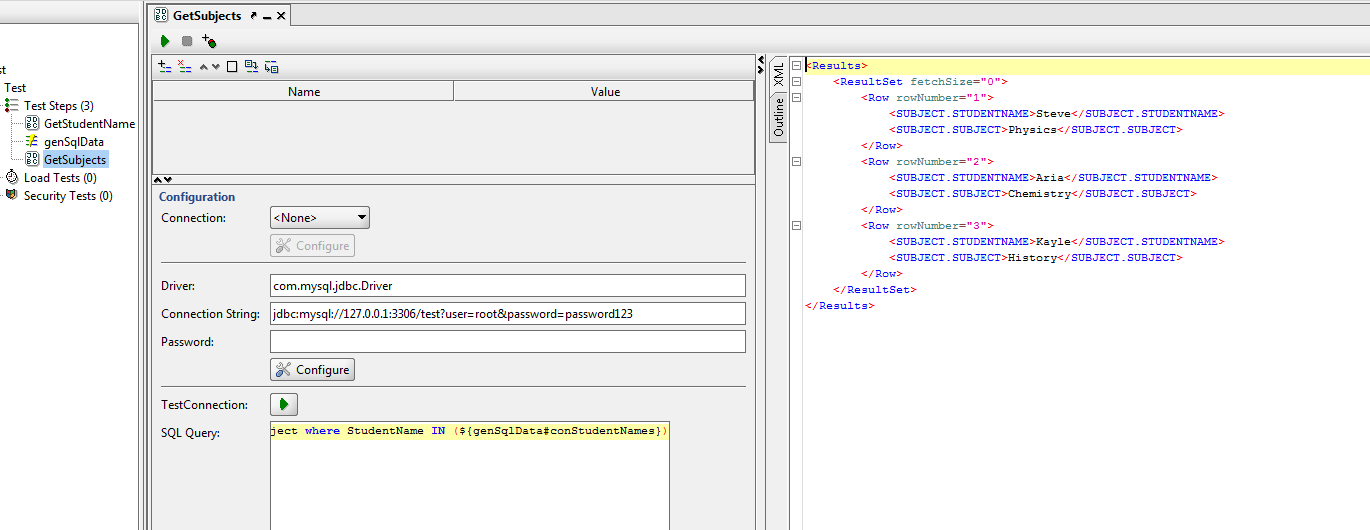
  3. Finally add another JDBC step to the test case. This step will query the Subject table uisng WHERE IN Clause and IN value will be the parameter created in step 2 above.
Code:
def groovyUtils = new com.eviware.soapui.support.GroovyUtils(context)
def holder = groovyUtils.getXmlHolder("GetStudentName#ResponseAsXml")

def concSqlString=""   //initialize parameter string concSqlString
def cnt =1             //initialize counter

//Get the total count of records that have the CLASS.STUDENTNAME
def xmlRecCount=holder["count(//Results[1]/ResultSet[1]/Row/CLASS.STUDENTNAME)"]


//check if only one row is returned
if (xmlRecCount.toInteger()==1)
{
      node = holder.getNodeValue('//Results[1]/ResultSet[1]/Row/CLASS.STUDENTNAME')
     concSqlString=concSqlString +"\""+node+"\""
}
else{
        //for each node, concatenate the node value to concSqlString variable
 for (node in holder['//Results[1]/ResultSet[1]/Row/CLASS.STUDENTNAME'])
 {
 if(cnt<xmlRecCount.toInteger()){
  concSqlString=concSqlString+"\""+node+"\","
  cnt=cnt+1
 }
 else
 concSqlString=concSqlString +"\""+node+"\""
 }
}

//return the concSqlString 
return concSqlString

Friday, March 2, 2012

Monitoring specific MySQL counters using LoadRunner

You can monitor MySQL database using Sitescope. However, if you don't have access to the Sitescope application then you can write a simple LoadRunner script to monitor specific MySQL counters and plot the values using lr_user_data_point LR function. The following script is an enhancement to MySQL script detailed in my earlier post.

NOTE:
All session related information in MySQL is stored in a table called "SESSION_STATUS". Therefore, we will be querying this table for MySQL counter values.

For demonstration purpose, the script below will query the values for LAST_QUERY_COST, OPENED_TABLES, QCACHE_HITS, SELECT_FULL_JOIN and SELECT_SCAN counters.

Global declaration
#include "C:\\Program Files\\MySQL\\oldfiles\\include\\mysql.h" //mySQL.h path is included 

/*MySQL structure defined*/
MYSQL *mySQL;
MYSQL_ROW row;
MYSQL_RES *result;
int MyRC;

char *MySQLserver = "localhost"; // Location where server is running
char *MySQLuser = "root"; // User name used to connect to the database
char *MySQLpassword = ""; // Not a good idea to leave password empty
char *MySQLdatabase = "information_schema"; //Database name 
int MySQLport = 3306; // Database port

Vvuser_int
//libmysql.dll file loaded using lr_load_dll function
 MyRC= lr_load_dll("C:\\Program Files\\MySQL\\MySQL Connector C 6.0.2\\lib\\opt\\libmysql.dll"); 

 //Initialise mySQL connection handler
 mySQL= mysql_init(NULL);

 // Connect to the database
 mysql_real_connect(mySQL,MySQLserver, MySQLuser, MySQLpassword, MySQLdatabase, MySQLport,NULL,0);

 return 0;

Query Function
double atof(const char *string); // Explicit declaration
Query()
{  
    int i=0;
    float VarValue[5]; //Float variable array
    /*Save SQL statement into variable into sqlQuery.
     This query returns values for the variable name ={LAST_QUERY_COST,OPENED_TABLES,QCACHE_HITS,SELECT_FULL_JOIN,SELECT_SCAN}*/ 
 lr_param_sprintf("sqlQuery","select variable_value from session_status where variable_name IN"
      "('LAST_QUERY_COST','OPENED_TABLES','QCACHE_HITS','SELECT_FULL_JOIN','SELECT_SCAN')");

 mysql_query(mySQL, lr_eval_string ("{sqlQuery}")); //Execute SQL statement

 result = mysql_store_result(mySQL);   //Result of the sql statement is placed into MYSQL_RES result structure
  
 row=mysql_fetch_row(result);   
     
 while(row!=NULL) //Iterate through to last row
 {
  VarValue[i]=atof(row[0]);  //Save float row value to VarValue
  row=mysql_fetch_row(result);  //Retrive next row of the fetched result
  i++;
 }

/*Use lr_user_data_point function to generate the graph*/
 lr_user_data_point("LAST_QUERY_COST", VarValue[0]);
 lr_user_data_point("OPEN_TABLES", VarValue[1]);
 lr_user_data_point("QCACHE_HITS", VarValue[2]);
 lr_user_data_point("SELECT_FULL_JOIN", VarValue[3]);
 lr_user_data_point("SELECT_SCAN", VarValue[4]);

 return 0;
}

vuser_end
/*Free the memory allocated to result structure and close the database connection*/
 mysql_free_result(result);
 mysql_close(mySQL);
 return 0;


NOTE: Make sure you are explicitly declaring the atof function before using it or else you will get totally different values. See the screenshot of the values received for the above counters when atof was not declared explicitly before using it.

Saturday, September 10, 2011

Using MySQL database for LoadRunner parameter

Recently, a friend wrote a blog where he solved a tricky situation by using parameter file rather than using database for parameter. The scenario was as follows:

"This particular scenario required that a user logged on to the Application can only perform particular searches based on criteria defined and assigned to that particular user. That is,VUSER1 can only search on terms1, terms2 and terms3 whilst VUSER2 can only search on terms4, terms5 and so on."

I have not come across a situation where I had to use database for LR parameter. Therefore, as a challenge(as well as to learn something new) I wrote a simple LR script to solve this problem using database.

NOTE:
1: You will need to add error handling code to the script.
2: Haven't had a chance to check out how much memory this code consumes since I am using mysql_store_result function to store the result into memory.
3: All the applications were running on localhost. You will need to change the database connection details, if you need to connect to remote MySQL server.
4: Also you will need to add all the library files and DLL(see below) on a system that will be executing this script. That is either the vugen or LR agent machines.


Steps:

1: You will first need to download and install MySQL database.
2: Download C driver for MySQL (Connector/C)
3: Create a database, table and add records into the table as shown below in screenshot.

4: In LoadRunner you will need to include mysql.h header file which comes with C driver. You might also need to update path of the following header files in mysql.h.
-mysql_com.h
-mysql_time.h
-mysql_version.h
-typelib.h
-my_list.h
-my_alloc.h

5: You will also need to add a function to load the DLL(libmysql.dll) which allows LR to connect to the MySQL database. Add this file in the vuser_init function.

6: You will need to add all the database connection details. You will need to replace the below values with your database details.
char *MySQLserver = "localhost";
char *MySQLuser = "root";
char *MySQLpassword = "";
char *MySQLdatabase = "loadrunner";
int MySQLport = 3306;

7: Your global.h and vuser_init will look something like this.
vuser_init()
{   
 //libmysql.dll file loaded using lr_load_dll function
 MyRC= lr_load_dll("C:\\Program Files\\MySQL\\MySQL Connector C 6.0.2\\lib\\opt\\libmysql.dll"); 
       

 //initialise mySQL connection handler
 mySQL= mysql_init(NULL);
 
 // Connect to the database
 mysql_real_connect(mySQL,MySQLserver, MySQLuser, MySQLpassword, MySQLdatabase, MySQLport,NULL,0);

 //save SQL statement into variable into sqlQuery
 //This stamentement returns result that matches UserName = {Vuser} parameter
 lr_param_sprintf("sqlQuery","SELECT SearchTerm FROM lrdata WHERE UserName='%s'",lr_eval_string("{Vuser}"));

 //Execute SQL statement
    mysql_query(mySQL, lr_eval_string ("{sqlQuery}"));

 //result of the sql statement is placed into MYSQL_RES result structure
 result = mysql_store_result(mySQL);


 //num_fields = mysql_field_count(mySQL);


 return 0;
}

8: In Action function, add following code.
NOTE: Make sure you have created an LR parameter called "Vuser" that has a text format "Vuser%s" so that a correct vuser name is passed into the sql statement.

//1: initialize connection handler
//2: connect to the database server
//3: Execute SQL statement
//4: Close the connection to the database server 


Action()
{ 
 row=mysql_fetch_row(result);   //retrive next row of the fetched result

 //Incase # of transactions to be executed is more than returned sql result
 //move the result pointer to first row
 // This is similar to "Continue in cyclic manner" for When out of values option in LR    
 if(row==NULL)   
 {
    mysql_data_seek(result,0);
       row=mysql_fetch_row(result);
       lr_output_message("The searched term for [%s] is: [%s]",lr_eval_string ("{Vuser}"), row[0]);
 }  
 else  // print the fetched row 
 {
  lr_output_message("The searched term for [%s] is: [%s]", lr_eval_string ("{Vuser}"),row[0]);
 }

 return 0;
}

9: In your vuser_end function add following code.
vuser_end()
{   
    //free the memory allocated to result structure and close the database connection
 mysql_free_result(result);
 mysql_close(mySQL);

 return 0;
}

10: Running this code for five iterations, we get following result.

If you find any bugs in the code or you have an updated(/improved) version of this code, please leave a comment.